Find all roots of a cubic
Factor the polynomial, then use the zero-product rule. MathDocs gives exact roots, including one half.
Try the cubic →
 MathDocs CAS
 for Google Docs™
MathDocs CAS is a free computer algebra tool for Google Docs™. Write equations, find exact answers and add graphs alongside your reasoning.
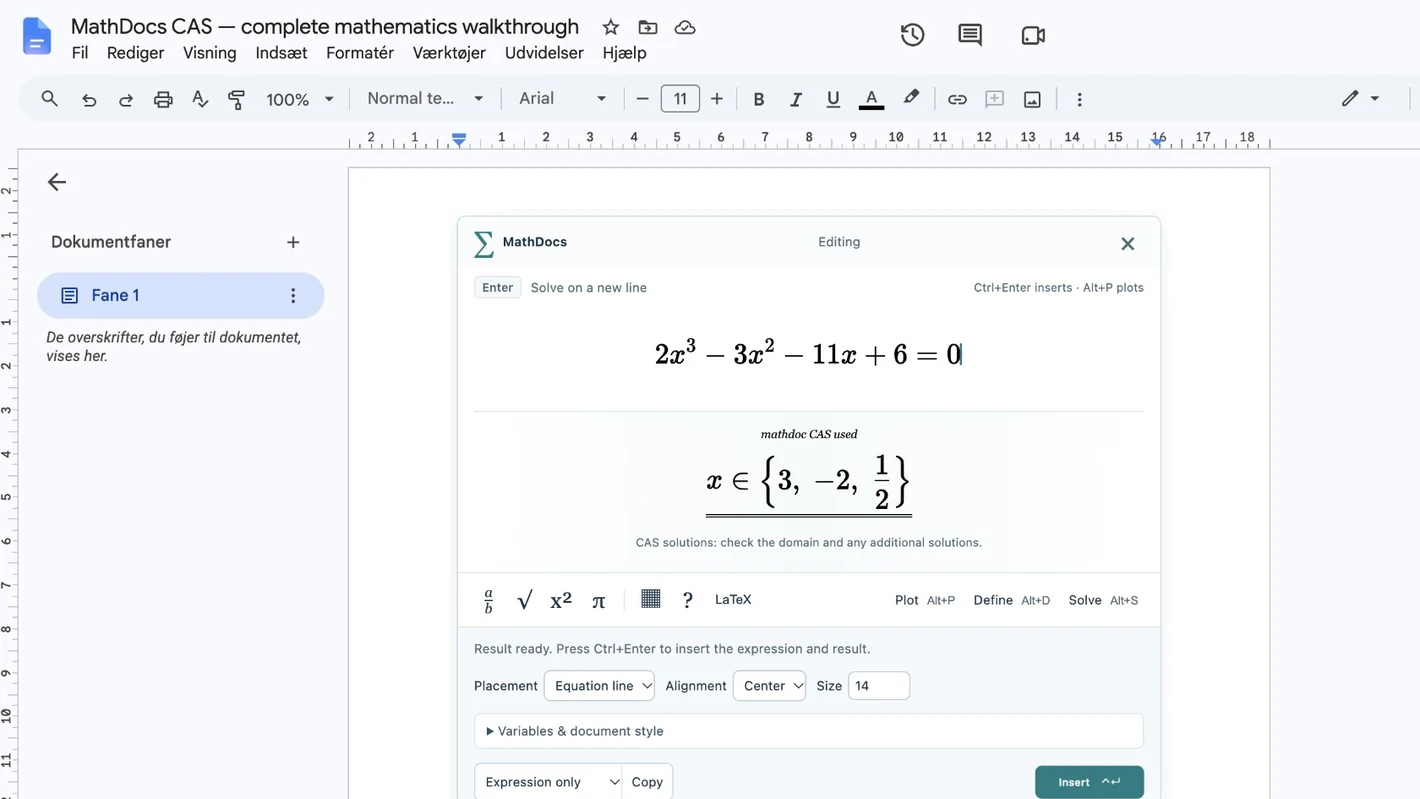
The editor displays the full solution set before you insert it.
Watch the demo ↓Type a cubic in Google Docs™, solve for its exact roots, insert the working, differentiate a product and save a function plot.
Factor the polynomial, then use the zero-product rule. MathDocs gives exact roots, including one half.
Differentiate each factor in turn and use the product rule. Keep the symbolic result with your explanation.
This is a working calculator using the MathDocs math engine. Choose an example, change it, and solve or plot it.
Browser demo only. It does not access or save a Google document. Calculations stay in this browser; no account is needed.
The complete MathDocs experience uses both the Docs add-on and the Chrome extension. Already have one? Follow the guide to install the other.
Install the add-on from Google Workspace™ Marketplace and open MathDocs from your document.
Adds the editor on the document page and keyboard shortcuts. It needs the Docs add-on for saving formulas.
MathDocs CAS is ready for Google Docs™. Install both parts for the complete on-page workflow.
 BY SKAYBASE
MathDocs CAS is built by Skaybase around a simple idea: writing up a maths solution should feel as natural as solving it. Keep the steps, the notation and the result together in your document.
This independent project is still in preview. Feedback helps shape the rough edges into useful tools. If something feels awkward — or you have an idea — contact Skaybase directly.
Skaybase
Say hello or share feedback ↗Yes. MathDocs CAS is free to use. The browser demo needs no account.
Yes, for the complete on-page experience. The Chrome extension provides math fields and shortcuts; the Docs add-on provides document access and saving. Already have one? The installation guide takes you to the other. The add-on also includes a separate editor in the Extensions menu.
Yes. Saved formulas are images, so other people can view and print the document without installing MathDocs. Editing the mathematical source needs MathDocs. These are not native Google equation objects; exporting or re-encoding an image can remove its source metadata.
The visual editor calculates in a local browser worker. Google Apps Script™ handles the current-document connection and saving. The browser demo stays in this browser and does not connect to your documents. There are no advertising or analytics trackers.
Install the Docs add-on and Chrome extension from their official stores above.
Contact Skaybase using the link below. An example expression, what you expected, and what actually happened are useful starting points. The project is actively being improved.
Start with a fraction. Stay for the rest of the assignment.